If you search for OpenHuman in English, you are usually not hunting for an academic paper. You want a straight answer to three practical questions: What is OpenHuman?, Is it worth installing? (an honest OpenHuman review), and How do I install it? (OpenHuman install / OpenHuman tutorial). This page is Hashvps’s OpenHuman pillar guide—one long-form entry that covers installation, OpenHuman Long-Term Memory, the Memory Tree, comparisons with ChatGPT / Mem0 / OpenClaw / Claude Projects, real-world usage, and what to do when you need your Personal AI online around the clock. Future deep dives on install runbooks and memory architecture will link back here.
In one line: OpenHuman is one of the most talked-about Personal AI paths in 2026—an open-source OpenHuman Desktop Agent that ships as a full OpenHuman AI Assistant, pulls context from email, code, and calendars into local long-term memory, and saves you from re-introducing yourself every Monday morning.
The 30-second version:
-
OpenHuman Personal AI
A desktop OpenHuman AI Assistant that OAuth-connects Gmail, GitHub, and more, then builds OpenHuman Long-Term Memory on your machine.
Local-first
-
Install before you judge
Follow the OpenHuman install tutorial below; most people can get a first sync in about fifteen minutes. Do not rely on architecture posts alone.
Install / Setup
-
Always-on is a separate problem
Closing your laptop lid pauses sync. For 7×24 channel duty, read the always-on section at the end—you do not need cloud hardware to start with OpenHuman.
Limits → options
1. What is OpenHuman?
OpenHuman is TinyHumans AI’s open-source Personal AI super intelligence stack. The official tagline—Private, Simple, Extremely powerful—maps to a concrete product shape: an OpenHuman Desktop Agent (Rust + Tauri) you install on macOS, Windows, or Linux, with a built-in OpenHuman AI Assistant chat surface, 118+ third-party integrations, and a local Memory Tree knowledge base. It is not another browser skin on ChatGPT.
OpenHuman aligns with the “personal AI digital twin” narrative in a specific way: you can swap underlying models (Claude, GPT, and others), but OpenHuman keeps accumulating who you are and what you are working on. Memory defaults to your machine—SQLite plus a Markdown Vault you can read, diff, and back up. Some login and managed-integration flows touch TinyHumans’ backend; read the README’s Local + managed notes before your first OAuth grant.
For English-language searchers, “What is OpenHuman?” often sits next to questions about privacy and control. Unlike a pure SaaS assistant, the OpenHuman Desktop Agent gives you filesystem-visible artifacts: vault files you can open in Obsidian, a database you can snapshot before upgrades, and integration scopes you approve one service at a time. That local-first posture is why builders compare OpenHuman to memory SDKs and gateway stacks rather than to a single chat subscription.
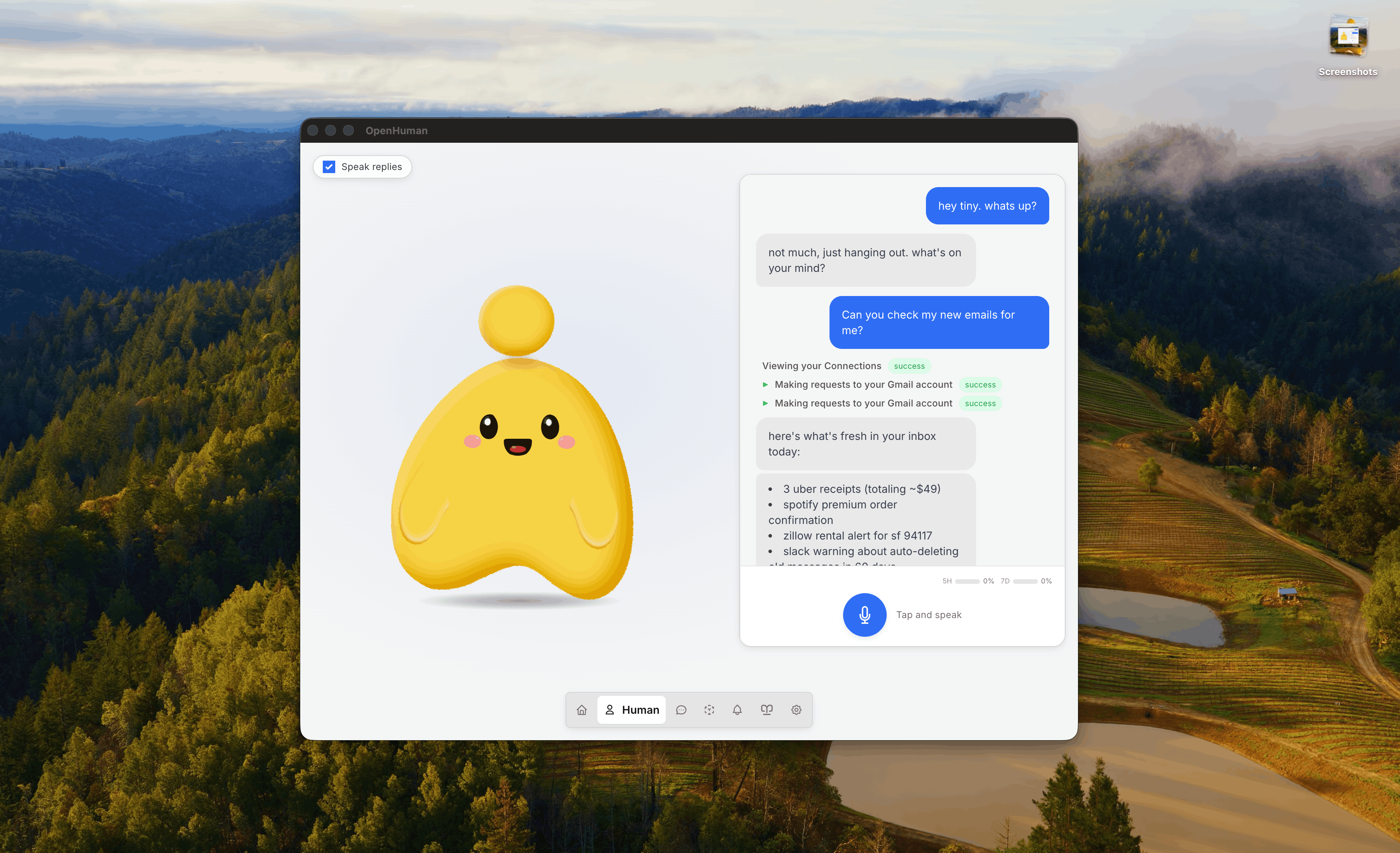
If you have only used web chat, the mental model shift is worth stating plainly: OpenHuman is a resident Personal AI application, not a bookmark. It runs background auto-fetch jobs, maintains a structured memory layer, and injects that context when you ask the OpenHuman AI Assistant a question days later. The model answers; OpenHuman supplies continuity.
2. Why is OpenHuman trending?
By early 2026, OpenHuman crossed thirty thousand GitHub stars and showed up on Trendshift and Product Hunt because it landed in the middle of a Personal AI search wave. Users were less interested in a model that scores five percent higher on a benchmark and more interested in OpenHuman Long-Term Memory—the ability to ask on Wednesday, “What did we agree with Client A about payment callbacks?” and get an answer grounded in email from Monday, not in whatever you remembered to paste into a chat box.
- Most people who search
OpenHumanhave OpenHuman tutorial or OpenHuman install intent; they want a runnable app, not a whitepaper. - Technical media covers Memory Tree architecture, but the viral entry point remains “install a Personal AI Assistant that actually knows my week.”
- Unlike ChatGPT Memory alone, OpenHuman pulls context from authorized Gmail, GitHub, Slack, and calendars—not only from sentences you typed inside a single chat thread.
- The project’s open-source posture lowers trial cost: you can validate whether OpenHuman Long-Term Memory fits your workflow before committing to any cloud always-on stack.
Another driver is fatigue with context re-entry. Knowledge workers live across five SaaS tabs; each tab holds a slice of truth, and none of them talk to your generic chatbot unless you manually export and upload. OpenHuman’s bet is that auto-fetch plus local memory beats yet another “prompt template” for people who already drown in inbox and issue-tracker noise.

Trending status also attracts skeptics—fairly so. Early Beta software moves fast; integrations break; summaries can be noisy if you connect everything on day one. The hype is a signal that Personal AI with durable memory is a real category, not that every installer will have a magical experience on hour one. That is why this guide pairs enthusiasm with install steps, comparison tables, and honest limits in section 11.
3. OpenHuman AI Assistant: core capabilities
Treat the OpenHuman AI Assistant as a desktop co-pilot with long-term recall. When you write an OpenHuman review, these five capabilities are what you should actually exercise in the first week:
- UI-first onboarding: Short install wizard, no YAML required upfront. Matches how English speakers search OpenHuman setup—open app, connect services, ask questions.
- 118+ integrations: Gmail, GitHub, Slack, Google Calendar, and dozens more via OAuth, exposed as tools the agent can call.
- Auto-fetch: Roughly every twenty minutes, incremental pulls land in OpenHuman Long-Term Memory without you writing scrapers.
- Memory Tree + Vault: Machine retrieval for the agent, human-readable Markdown for you—including Obsidian-compatible files.
- Optional persona and voice: Desktop mascot, meeting agent modes, and other product-layer features documented in the official GitBook.
OpenHuman is not a memory SDK you embed in your own bot. It is a complete Personal AI product—a distinction that matters when you compare it to Mem0 or OpenClaw later in this guide.
Operationally, the OpenHuman AI Assistant sits at the center of a loop: integrations write, Memory Tree organizes, the model reads. You can still bring your own API keys for Claude or GPT routes; OpenHuman does not lock you to one vendor for inference. What it does lock in—in a good way, for many users—is continuity across days. The assistant remembers that Issue #42 and Thursday’s sync exist because fetch jobs ingested them, not because you summarized your week in a single Sunday prompt.
Power users should still define boundaries: read-only GitHub tokens, selective Gmail labels, Slack channels instead of entire workspaces. The assistant is only as clean as the signal you feed it. That discipline separates a crisp OpenHuman review from a blog post that connected twelve services on minute one and declared the memory layer “noisy.”
4. OpenHuman install tutorial (Install / Setup)
Below is a general OpenHuman install path (macOS first; Windows and Linux builds are on the official README). Button labels change between releases—trust the client UI if anything drifts.
- Download: Grab the latest build from tinyhumans.ai/openhuman or GitHub Releases.
- (Recommended on macOS) Homebrew:
brew tap tinyhumansai/core && brew install openhuman - Install and launch the OpenHuman Desktop Agent; approve the app in System Settings if macOS Gatekeeper prompts you.
- Sign in / create a workspace; add model API keys if you are not using bundled routing.
- Integrations → connect Gmail first and confirm mail summaries appear in memory.
- Connect GitHub (read-only scopes are enough for many users) so issues and PRs enter the Memory Tree.
- Wait for the first auto-fetch cycle (plan thirty to forty minutes; do not close the lid or shut down immediately).
- Open Memory / Wiki views and verify summaries grouped by source or date.
- Ask the OpenHuman AI Assistant three probe questions (see the real-experience section below).
English-language tutorials often skip the waiting step. OpenHuman Long-Term Memory is empty until fetch jobs populate it; judging the product after six minutes is like declaring email broken before the first sync finishes. Schedule your first session when the machine can stay awake, on power, with network stable.
If Homebrew is your norm, the one-liner brew install openhuman after tapping tinyhumansai/core is the fastest reproducible path for teams documenting internal OpenHuman setup runbooks. Pin the release version in your notes if you need rollback clarity during Early Beta cycles.
5. How OpenHuman Long-Term Memory works
When users say “OpenHuman local memory,” they mean the OpenHuman Long-Term Memory pipeline—you do not manually upload every PDF:
- OAuth authorizes a data source (Gmail, GitHub, etc.).
- Auto-fetch pulls incremental updates on a schedule.
- Content is cleaned, chunked, and multi-level summarized to control token cost.
- Results land in local SQLite (for agent retrieval) and a Markdown Vault (for human review).
- At question time, relevant summaries inject into context instead of a cold start with zero background.
This is fundamentally different from “store chat history longer.” Memory comes from your real workflow—the same reason searches for Personal AI, personal AI assistant, and personal AI digital twin often describe one underlying need: stop being the integration layer between your apps and your model.
From a privacy angle, local SQLite plus Vault means you can inspect what the system remembered before it influences an answer. Delete a vault file, re-run fetch, or revoke OAuth—actions that are awkward or impossible when memory only exists inside a vendor’s opaque cloud feature. That transparency is a core part of the OpenHuman Desktop Agent value proposition for English-speaking professionals evaluating OpenHuman review threads on Hacker News or Reddit.
Summarization is not magic. Auto-fetch can miss threads, mis-rank old email, or over-compress a nuanced negotiation. Treat injected memory as high-quality notes, not courtroom evidence, until you validate against source apps. The win is speed: you start from a draft summary instead of a blank prompt.
6. What is the Memory Tree?
The Memory Tree is how OpenHuman organizes Long-Term Memory: data is structured at write time by source, topic, and daily global views, so queries pull targeted summaries instead of vector-scanning an entire corpus every turn. Most users only need three ideas:
- By source: one tree for mail, another for GitHub, another for Slack.
- By topic: clients and projects aggregate across sources.
- By today: a bird’s-eye “what happened today” lens.
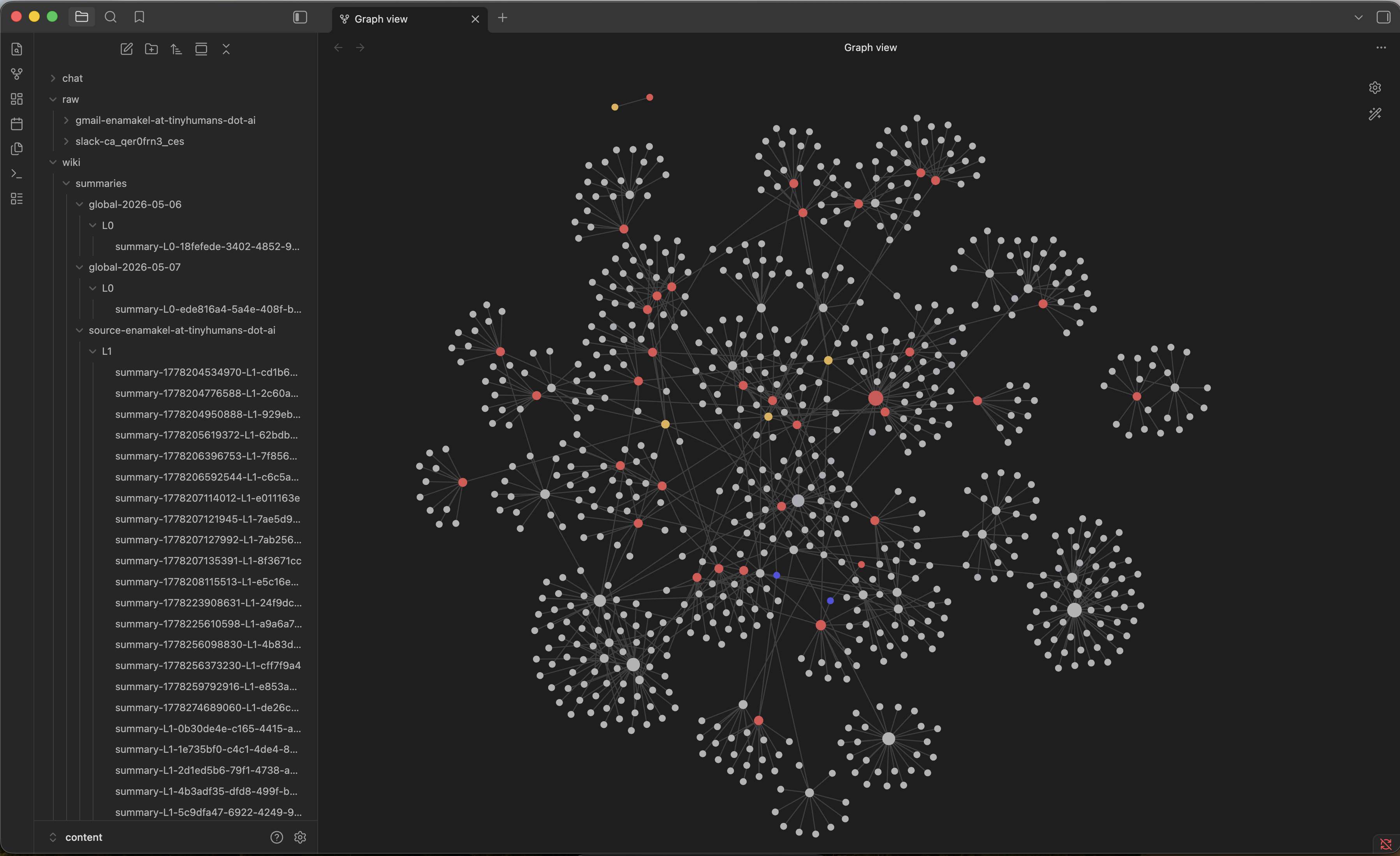
Engineers may dig into buffer, seal, and cascade layer names; the one percent searching OpenHuman Memory Tree architecture can start with the diagram above plus the Auto-fetch documentation.
Why structure at ingest time? Latency and coherence. A flat embedding index of everything you ever received would be flexible but expensive and fuzzy. The Memory Tree trades a bit of upfront organization for answers that feel like opening the right notebook instead of shuffling a warehouse. When you export vault Markdown into Obsidian, you are looking at the human-facing side of that same structure.
For teams, the Memory Tree also clarifies debugging: if GitHub context is wrong, inspect the GitHub branch of the tree rather than re-litigating the whole Personal AI stack. That modularity helps when you write internal runbooks around the OpenHuman AI Assistant.
7. OpenHuman Desktop Agent vs ChatGPT
This is the standard answer to OpenHuman vs ChatGPT: ChatGPT is a general cloud advisor; OpenHuman is a Personal AI Desktop Agent with OpenHuman Long-Term Memory.
| Dimension | ChatGPT | OpenHuman |
|---|---|---|
| Form factor | Browser / mobile app | OpenHuman Desktop Agent |
| Memory | Chat history + vendor Memory feature | OpenHuman Long-Term Memory + multi-source auto-fetch |
| Data location | Mostly OpenAI cloud | Local Vault / SQLite by default |
| Best for | One-off Q&A, drafting | Personal AI across mail / code / calendar |
ChatGPT remains excellent for quick drafts, brainstorming, and tasks where you paste all context inline. OpenHuman wins when context lives outside the chat window—negotiation threads, issue comments, meeting moves on calendar. Many English-speaking users run both: ChatGPT for speed, OpenHuman AI Assistant for continuity.
Search intent matters. If your query is “write me a cover letter,” ChatGPT is fine. If your query is “where did we land on pricing with Client A after last week’s thread?” you are asking a memory product question—that is where the OpenHuman Desktop Agent justifies disk space and OAuth scopes.
8. Competitive comparisons: Mem0, OpenClaw, ChatGPT Memory, Claude Projects
8.1 OpenHuman vs Mem0
OpenHuman vs Mem0: Mem0 is a memory SDK you embed in agents you build yourself. OpenHuman is a complete Personal AI with an OpenHuman AI Assistant UI, integrations, and fetch jobs already wired. Choose Mem0 if your goal is “I am writing a custom bot.” Choose OpenHuman if your goal is “I want an app that remembers me after install.”
Mem0 shines in bespoke pipelines—you control retrieval APIs, storage backends, and agent frameworks. OpenHuman trades that flexibility for time-to-value: OAuth buttons instead of schema design. Teams with existing agent platforms sometimes use both concepts in parallel: Mem0 inside a proprietary service, OpenHuman on the founder’s laptop for personal continuity.
8.2 OpenHuman vs ChatGPT Memory
OpenHuman vs ChatGPT Memory: ChatGPT Memory primarily retains facts you stated in chat. OpenHuman also ingests authorized Gmail, GitHub, and other connected sources. If your work context never lived inside the ChatGPT dialog, OpenHuman Long-Term Memory matches the job better.
ChatGPT Memory improved the “remember I prefer bullet points” class of problem. It does not automatically read your issue tracker or inbox unless you copy content over. For consultants, founders, and staff engineers whose truth is scattered across SaaS, that gap is the whole point of the OpenHuman Desktop Agent.
8.3 OpenHuman vs Claude Projects
OpenHuman vs Claude Projects: Claude Projects excel when you upload files and project instructions inside Anthropic’s ecosystem. OpenHuman is a local Personal AI that spans more SaaS surfaces and keeps the Memory Tree updating as fetch jobs run. Reasonable split: Claude for long-form drafting in a project folder; OpenHuman for “what actually happened in my real accounts this week.”
Claude Projects are powerful for bounded engagements—a legal memo workspace, a product spec folder. They are less automatic for living systems like email and GitHub that change hourly. OpenHuman’s auto-fetch is the differentiator for people who will not manually upload every thread.
8.4 OpenHuman vs OpenClaw
OpenHuman vs OpenClaw should not be framed as direct competitors:
- OpenHuman: Desktop Personal AI Assistant; strength is OpenHuman Long-Term Memory and install-and-use simplicity.
- OpenClaw: Self-hosted Gateway + Workspace + Channels; strength is 7×24 Telegram / Slack digital twin duty on a Mac that stays online.
Optional combo: run OpenHuman locally to curate memory, then export high-confidence rules into an OpenClaw Workspace on a cloud Mac. For OpenClaw deployment, see our digital twin guide—not a prerequisite for installing OpenHuman.
English readers often discover both names in the same week because both touch “personal AI.” Keep the layers separate: OpenHuman is memory and desktop assistant UX; OpenClaw is residency, channels, and gateway process supervision. You can love one, both, or neither without contradiction.
9. Real experience: before and after
Below is a representative OpenHuman review scenario—fictionalized but faithful to common knowledge-worker flows:
| Stage | Without OpenHuman | With OpenHuman |
|---|---|---|
| Monday | Email locks payment plan; GitHub Issue #42 opened; Slack notes Thursday joint debug | Same events, now in OpenHuman Long-Term Memory |
| Wednesday | Deadline fuzzy; search three apps | Ask the OpenHuman AI Assistant: “Status on Client A payment?” |
| Answer | “Please provide background…” | “Email agreed async callback; #42 still open; Thursday debug on calendar.” |
If three probe questions miss after install, check whether sync finished—do not blame model intelligence first.
Good probe questions reference facts you did not paste into chat: a client codename, an issue number, a meeting mentioned only in Slack. Weak probes (“summarize Python”) do not test OpenHuman Long-Term Memory at all. A fair OpenHuman review exercises memory, not generic trivia.
After a successful week, many users report fewer context-switch taxes: less alt-tabbing to Gmail, less scrolling issue history before standup. The assistant does not replace those apps; it compresses retrieval time. That is the before/after worth measuring if you are deciding whether the OpenHuman Desktop Agent earns a permanent dock icon.
10. Who should use OpenHuman? Is it worth installing?
Good fit: Heavy email + GitHub + calendar users; anyone exploring Personal AI / OpenHuman AI Assistant with tolerance for Early Beta rough edges; people who already pay for model APIs and want those calls to include real context.
Poor fit: Occasional web-only Q&A; strict enterprise compliance regimes that forbid local agents with broad OAuth; anyone who requires a closed laptop to answer Telegram at 3 a.m. without extra infrastructure (see section 11).
Is it worth installing? If you match the first group, follow section 4 and trial two weeks. If the time you save hunting across apps exceeds install and tuning cost, keep it. If not, uninstall cleanly and revoke OAuth—no sunk-cost trap.
Students and hobbyists may enjoy OpenHuman as a learning surface for Personal AI memory, but the product shines for people with sustained multi-app workflows. Solo founders, developer advocates, customer success leads, and indie consultants often feel the pain earliest because they are their own integration layer.
Enterprise buyers should plan a pilot, not a fleet rollout: backup policy, data residency review, and acceptable OAuth scopes need internal sign-off. OpenHuman is open source, which helps inspection, but Early Beta velocity means you should not treat it as the sole system of record without exports and human verification loops.
11. Always-on options: OpenHuman limits and how to solve them
Logic first, infrastructure second—so this guide does not read like a server sales pitch dressed as an OpenHuman tutorial.
11.1 OpenHuman limits (form factor, not failure)
- Laptop lid closed → auto-fetch pauses; the OpenHuman AI Assistant is not reachable as a resident service.
- OAuth expiry or full disk → you think memory is current, but the Memory Tree stopped updating silently.
- Multiple devices → two memory silos unless you design sync or pick one canonical machine.
- Early Beta → backup before upgrades; do not treat vault snapshots as immutable production truth.
None of these negate the Personal AI value on a primary workstation. They define where the OpenHuman Desktop Agent stops and where always-on engineering begins.
11.2 When do you actually need always-on?
Only when you are away from the keyboard but still want a Personal AI to answer messages, run schedules, or accept webhooks—classic example: Telegram night shift while you sleep. Desktop OpenHuman alone does not solve residency; it solves memory while the machine is awake.
Always-on is a different search intent from “What is OpenHuman?” or “OpenHuman install.” Recognize the fork early so you do not reject a memory product because it will not act as a 7×24 gateway without additional setup.
11.3 Common paths (lightest to heaviest)
- Keep the lid open with external power: Lowest cost; works for home offices that can leave a Mac awake.
- Dedicated home Mac mini: Move the OpenHuman Desktop Agent to an always-plugged Mac; use remote desktop from a laptop on the road.
- Cloud-dedicated Mac: While you travel with a closed lid, a remote Mac continues sync and agent processes—for users who already run macOS workloads off-prem.
Hashvps offers the third pattern as macOS cloud hosts (Canada M4 bare metal, dedicated IPs)—useful for 7×24 macOS workloads some teams run alongside OpenClaw Gateway, build runners, or remote agents. That is not required for OpenHuman. Most readers should install locally, prove OpenHuman Long-Term Memory helps, then decide whether paying for online residency is worth a separate line item.
If you later choose OpenClaw for multi-channel twin duty plus cloud Mac, read the headless install guide; it complements OpenHuman’s memory layer rather than replacing it.
12. Summary
This OpenHuman complete guide collapses to one sentence: What is OpenHuman? → A Personal AI Desktop Agent / OpenHuman AI Assistant built around OpenHuman Long-Term Memory and the Memory Tree. Install via section 4; understand memory in sections 5–6; choose alternatives in sections 7–8; judge value in sections 9–10; handle lid-close and always-on in section 11. Treat this page as the pillar entry—future posts on OpenHuman install edge cases and Memory Tree deep dives will link here.
English search traffic clusters on practical verbs: install, review, versus ChatGPT. This guide answered those directly while naming the deeper architecture enough that you will not be surprised on day three. Keep the app if memory saves time; add infrastructure only when residency becomes a real requirement, not a hypothetical one.
13. Frequently asked questions (FAQ)
Q1. What is OpenHuman? How does it relate to Personal AI?
OpenHuman is an open-source Personal AI product. The OpenHuman AI Assistant is its conversational surface; OpenHuman Long-Term Memory is its main differentiator versus generic chat.
Q2. How do I install OpenHuman?
See section 4: download from GitHub Releases or run Homebrew brew install openhuman after tapping tinyhumansai/core.
Q3. Is OpenHuman worth installing? (OpenHuman review)
If you live across email, GitHub, and calendars and hate repeating background—try two weeks. If you only need occasional web chat, skip it.
Q4. Is OpenHuman free?
The client is open source. Model inference and some managed services may cost money; check official pricing on TinyHumans properties.
Q5. OpenHuman vs ChatGPT—which should I pick?
ChatGPT for fast one-offs; the OpenHuman Desktop Agent when you need OpenHuman Long-Term Memory across mail, code, and calendar.
Q6. Do I need cloud Mac / OpenClaw before OpenHuman?
No. Install OpenHuman locally first. Consider always-on options in section 11 only if you need 7×24 channel duty.
Optional next step: when you need an agent while you are offline
Most readers can stop at section 10. If section 11’s third path—a dedicated cloud Mac—fits how you already work, you can browse Hashvps cloud Mac specs. That choice is independent of whether you keep OpenHuman on a laptop.